
- 0
- 891 words
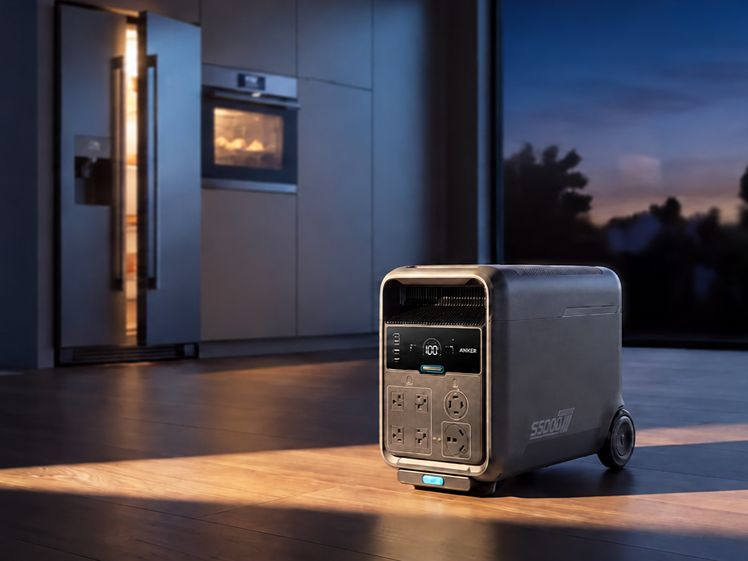
The Anker S5000 vs EcoFlow Titan 5000 comparison focuses on household connections for the US-market models. Assess essential circuits, solar compatibility, installation work, and the controls you need before choosing equipment.
Alt: Portable Power Station for Home Backup
Quick Answer: Which System Fits Your Home?
Choose S5000 for selected-circuit backup through compatible transfer equipment. Choose TITAN 5000 with Smart Home Panel 10 when automatic switching and circuit control are priorities. Both support direct appliance backup, but neither guarantees whole-home coverage: output limits, storage, and connected loads determine practical coverage.
How Does Each System Connect to Household Power?
Both systems power compatible appliances directly. Household circuit backup requires additional equipment and an approved installation.
Direct Appliance Backup Without Panel Wiring
Connect compatible refrigerators, routers, or lamps to the built-in outlets without modifying household wiring. This suits renters or households with a short essential-appliance list. Check plugs, running power, startup demand, and cable ratings.
Direct connections do not energize existing wall outlets. For hardwired loads or circuit backup, compare the connection routes below.
| Connection feature | Anker S5000 | TITAN 5000 |
| Selected-circuit route | Compatible transfer equipment; inlet where required | Dedicated Smart Home Panel 10 |
| Switching and control | A manual transfer switch remains manual | Automatic backup and app-based circuit control |
| Panel compatibility | Not compatible with SOLIX Home Power Panel | Up to 10 selected circuits through the compatible panel |
A licensed electrician should confirm transfer isolation, grounding, and connection hardware. An inlet provides a connection point; it does not isolate utility power by itself.
What Should You Check Before Choosing a Home Backup Setup?
Evaluate energy demand, charging sources, product capabilities, and the installed cost as one system.
Essential Circuit Loads and Backup Runtime
Power determines which appliances run together; energy determines backup duration. Build a realistic load budget:
● Prioritize essential loads: Start with refrigeration, communications, and lighting; include motor startup demand.
● Calculate energy use: A constant 500 W load consumes 4,000 Wh in eight hours. This is an energy budget, not tested runtime.
● Allow for losses: Include inverter consumption and reserves. Use measured daily energy for cycling appliances.
Rooftop Solar Compatibility During Grid Use and Outages
Assess grid-connected operation and blackout operation separately. AC coupling connects storage on the AC side of an existing solar system. TITAN requires the 240 V Smart Home Panel 10 and a CT sensor for this arrangement.
Conventional grid-connected inverters normally stop during outages. Both stations also accept compatible panels directly through PV inputs, separately from rooftop-inverter connections. Have the installer confirm which charging paths remain available during a blackout. Grid-use savings do not establish blackout charging compatibility. Request confirmation of the supported inverter, control equipment, and operating mode for the exact installation.
How Anker S5000 Fits These Home Backup Requirements
The Anker Solix S5000 features below help match appliance demand, outage duration, and available charging sources:
● 5,024 Wh storage, expandable to 30 kWh: Compatible BP5000 batteries add energy without increasing rated output; expansion equipment is sold separately.
● 120 V/240 V, 4,500 W continuous output: Supports compatible loads, with an 8,000 W peak for brief startup surges; outlet limits apply.
● Up to 3,000 W solar input: Two PV inputs accept compatible panels; voltage, current, and sunlight determine actual charging.
● Up to 4,500 W AC charging: Requires a compatible 240 V supply; 120 V charging supports up to 1,800 W.
● UPS switching within 10 ms: Supports compatible directly connected equipment; it does not automate a manual transfer switch.
EcoFlow TITAN 5000: Features for Circuit Backup
The standard model suits installations that prioritize automatic circuit management. Its relevant capabilities include:
● 5,017.6 Wh storage, expandable to 30 kWh: Up to five compatible extra batteries increase energy capacity; connection accessories require separate purchase.
● 7,200 W at 120 V/240 V: Supports higher combined appliance demand within outlet and system limits.
● 10-circuit panel integration: Compatible Smart Home Panel 10 enables automatic backup and selected-circuit management.
● Direct PV charging: Compatible panels replenish energy during outages; confirm input limits against the documentation supplied with the unit.
Installation Costs: Hardware, Labor, and Placement
Compare itemized installed quotes, rather than battery prices alone. Include these cost categories:
● Connection hardware: Compatible transfer equipment or a dedicated panel, approved cables, and monitoring accessories.
● Electrical work: Permits, inspection, circuit changes, labor, and commissioning where required.
● Placement: Dry conditions, ventilation, operating clearances, cable routing, and access for moving the unit.
Price expansion separately. Before handover, request a demonstration of switching, shutdown, and selected circuits under load. Ask whether the quote includes future cable changes and battery placement. A low equipment price can still require substantial electrical work when the existing panel needs modification.
Conclusion
For Anker S5000 vs EcoFlow Titan 5000, choose the complete installation that meets your priorities. S5000 offers a transfer-based route; TITAN with its dedicated panel adds automatic switching and circuit management. Confirm appliance compatibility, outage recharging, and installed costs before purchasing.
FAQ
Can I Use the Built-In Outlets During Home Panel Operation?
Do not assume simultaneous operation. The TITAN manual specifies that AC sockets are disabled when its dedicated AC input/output port connects to Smart Home Panel 10. For S5000, confirm permitted outlet and circuit loads in the approved design.
What Happens to Remote Control Without Internet?
Internet-based remote control needs connectivity. Local Bluetooth functions, where supported, depend on the model and app. Test essential controls before an outage and keep physical controls accessible.
Can I Disconnect the Unit for Trips After Home Integration?
Yes, following the approved shutdown and disconnection procedure. Leave hardwired equipment installed. While the portable unit is away, its selected circuits lose battery backup; arrange another source for equipment that must remain powered.
Author

khizarnisar367@gmail.com
Related Posts
HVAC Repair: A Complete Guide to Maintaining Efficient Heating and Cooling Systems
- 0
- 3,085 words
A comfortable indoor environment depends heavily on a properly functioning heating, ventilation, and air conditioning system. Whether it is maintaining cool temperatures...
Read out all
Fence Installation: Improving Property Security, Privacy, and Outdoor Appeal
- 0
- 3,492 words
A well-designed fence is an important addition to any residential or commercial property because it provides security, privacy, and a clearly defined...
Read out all
Everything You Need to Know About Ground Preparation, Soil Management, and Construction Projects
- 0
- 2,592 words
Preparing land for construction requires careful planning, specialized equipment, and a clear understanding of soil conditions. Whether a property owner is planning...
Read out all
Building Stronger Emergency Communication Infrastructure Through Smart Wireless Network Planning
- 0
- 2,615 words
Introduction Reliable communication infrastructure is an essential part of modern building safety, emergency preparedness, and effective incident management. Hospitals, educational institutions, commercial...
Read out all
Sewer Camera Inspection: A Complete Guide to Detecting and Preventing Drainage Problems
- 0
- 2,643 words
Introduction to Sewer System Maintenance Maintaining a properly functioning sewer system is essential for keeping residential and commercial properties clean, safe, and...
Read out all
Smart Strategies for Managing Electrical Demands and Improving Property Safety
- 0
- 2,545 words
Introduction Electricity plays an essential role in modern homes and commercial properties, powering everything from lighting and kitchen appliances to heating systems,...
Read out all