
- 0
- 1,327 word
Where to Place a Self-Emptying Robot Vacuum Dock
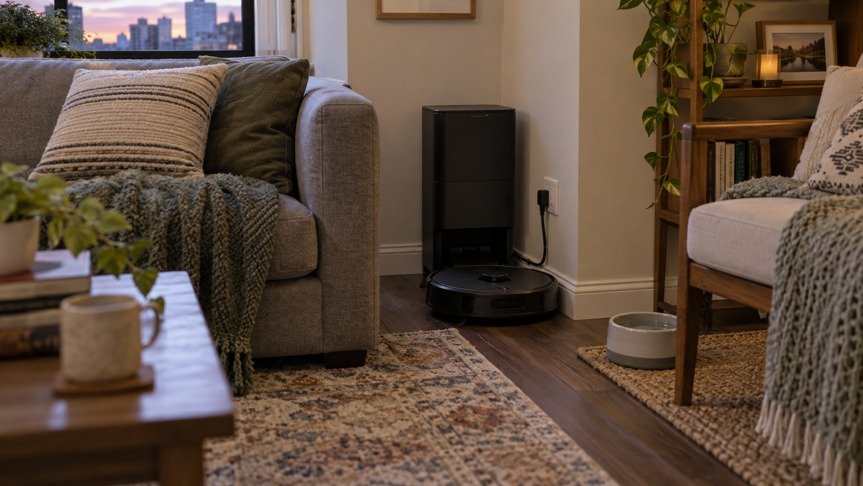
The new robot vacuum finishes its first run, heads toward the dock, and stops beside the sofa. The dock fit neatly against the wall, but a chair leg and a rug edge have turned the return trip into a rescue job. Moving the station across the room might fix that problem, yet the new spot could put a loud emptying cycle beside the bedroom. Where to put a robot vacuum dock is a household decision as much as a floor-space decision. Check the route, power and connection, noise, and daily access before settling on its permanent home.
Use this checklist to compare dock locations
A candidate location should pass more than a quick fit test. Use this list while you walk the robot’s likely route from the rooms it cleans most often.
| Check | What to look for | Why it matters |
| Return route | Clear floor in front of the dock, with no swinging door or movable chair in the approach. | The robot needs a consistent return path after each run. |
| Floor and threshold | A stable, level surface and a route that does not depend on crossing a troublesome threshold. | A station that moves or sits beyond an obstacle can lead to docking failures. |
| Power and Wi-Fi | A reachable outlet and a dependable connection where the station will stand. | A tidy-looking corner is no help if the cord or app connection is unreliable. |
| Noise | Distance from bedrooms and the seats used during cleaning hours. | Auto-emptying can be more noticeable than the robot’s normal movement. |
| Access | Room to open the station, remove a bag, and handle water tanks if the model has them. | Routine care becomes awkward when the station is boxed in. |
Each item can be tested at home during a normal cleaning cycle, so the following checks explain what to try, what to observe, and when to reconsider a location.
Test the return path and floor
A station tucked behind an armchair may disappear from view, but the robot still has to find it. Watch the approach at floor level. A coffee table foot, a rug corner, or shoes left beside the wall can narrow the final stretch. Furniture that shifts between runs is especially troublesome: a dining chair might be pushed in during setup and pulled out when the vacuum tries to return. Choose a place where the route stays open during an ordinary day, not just after a careful cleanup.
Put the dock on a firm, level floor against a stable wall, then follow the clearance directions for your specific model. Dock size and approach needs vary, and an all-in-one station may need access above or beside it as well as space in front. If a rug reaches the station’s edge, see whether the robot catches on it or turns sharply before docking. A flat path is easier to repeat than a route that depends on a lucky angle.
Test the outlet and Wi-Fi signal
The robot vacuum charging station needs an outlet within the reach of its supplied cord. Place it so the cord does not cross a walking lane or sit where the robot’s wheels can catch it. A power strip behind loose furniture can make the corner look clean in a photo, but it complicates access when the station needs to be unplugged or moved. Check the manufacturer’s power instructions before adding extension cords or changing the cable arrangement.
Wi-Fi deserves a test at floor level too. A phone showing a strong signal at shoulder height does not prove that a device near the floor will connect well behind a thick wall or appliance. Set the dock in the proposed position, connect the robot as its instructions direct, and try a normal run and return. If the app repeatedly loses the robot near that area, consider a location closer to reliable coverage.
Test dock noise during normal household activity
Self-emptying is convenient because the robot transfers collected debris into the dock. That transfer produces a brief, distinct sound. In an open-plan living room, the dock may sit close to the sofa, television, or a desk used for calls. Try a complete cleaning cycle while people are doing what they normally do in that space. The placement that looks unobtrusive at noon may be irritating during a film or a late work meeting.
Scheduling can help if your model and routine allow it, but placement still sets the baseline. A corner near a bedroom door or nursery shares sound through that opening. A utility area may put more distance between the dock and quiet rooms, provided the robot can reach it, the connection is stable, and the station is not shut into an unsuitable enclosure. eufy’s E28 support guidance specifically says not to place that model’s dock in a closet because moisture can make the enclosed space damp. That warning matters for a station that handles water as well as dust.
Compare an open room with a utility area
An open kitchen or living area often offers a simple route and a visible outlet. It also exposes the dock to everyday traffic and puts auto-emptying within earshot. Keep the dock away from splashes, food prep congestion, and places where chair legs routinely move across its approach. A spot along a wall outside the main walking line can be workable if there is room to reach the station for care.
A laundry room or mudroom can be appealing because the station is less prominent. The doorway is the deciding detail. Check whether the door is normally left open, whether the threshold is easy for the robot, and whether shoes or laundry baskets collect in front of the dock. If the room is humid or prone to water on the floor, review the model’s placement instructions before using it.
Check maintenance clearance for an all-in-one station
A dust-only dock needs access for its bag or container. A station that washes and refills a mop adds clean and dirty water handling to that routine. Leave practical working space based on the model’s instructions. The footprint printed for the station tells you what fits on the floor, while your hands need room around it.
Model-specific measurements can rule out a tight alcove before setup. eufy’s support page lists the Omni E28 station, including its portable deep cleaner, at 372.86 x 484.06 x 464.26 mm in length, width, and height. Its Robot Vacuum Omni E28 has an all-in-one station that handles self-emptying and mop care, so a narrow shelf above the dock or a deep cabinet around it could make the everyday service tasks harder. The model’s actual dimensions are a useful starting point for a cardboard floor outline, followed by a hands-on test of tank and bag access. Check the current manual for placement and clearance directions before committing to the spot.
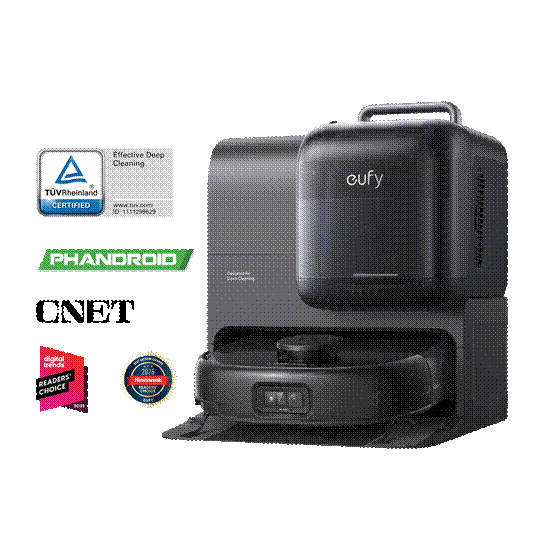
Alt: eufy Robot Vacuum Omni E28 docked at its all-in-one station
If the E28’s combined dust and water functions make sense for your floors, compare its station with those of other self-emptying robot vacuums using the space each dock requires at your home. A station that can handle more jobs still needs bag changes, water care, and a clear route. The better match is one you can service without turning every refill into a furniture-moving task.
The best place for a self-emptying dock is a spot the robot can reach reliably and the household can live with. Give the return path priority, then verify power, Wi-Fi, noise, and access for bags or water tanks. Before settling on an open living area or utility room, let the robot complete a normal run and return with doors and furniture in their usual positions. Listen to the emptying cycle at the hour you plan to clean, and check that a bag or tank can be removed without shifting the dock. A dock that is easy to reach and service is less likely to become another obstacle in the room.
Author

primestarfirm@gmail.com
Related Posts
Choosing a Solar Generator for the First Night of a Power Outage
- 0
- 1,010 word
When the lights go out after dinner, the immediate questions are usually practical. Can the refrigerator stay on? Will the internet connection...
Read out all
Why Quality Tile Work Makes All the Difference in Your Home
- 0
- 1,108 word
Few home upgrades deliver the same instant visual payoff as new tile. A well-installed floor, backsplash, or shower surround can transform a...
Read out all
How Do You Compare Custom Home Design Options?
- 0
- 991 words
Custom home designs are generally more difficult to compare than finished homes on the market because no one has ever built the...
Read out all
Creating a More Comfortable Home Through Reliable Heating and Cooling Solutions
- 0
- 2,331 words
The Importance of Indoor Temperature Control Maintaining a comfortable indoor environment is an important part of creating a functional and enjoyable home....
Read out all
Home Rewiring: Essential Electrical Upgrades for a Safer and More Efficient Living Space
- 0
- 2,905 words
A reliable electrical system is one of the most important parts of a comfortable and functional home. From lighting and heating to...
Read out all
The Benefits of Professional Cleaning for Homes, Offices, and Commercial Spaces
- 0
- 2,429 words
Professional Cleaning for Homes Maintaining a clean and organized environment is essential for creating comfortable spaces where people can work, relax, and...
Read out all