

- 0
- 945 words
A UPS battery should be replaced when it no longer provides the runtime or reliability your equipment requires. Age matters, but calendar years alone do not tell the full story. Temperature, charging conditions, discharge frequency and battery chemistry all influence service life. A unit that still powers on may no longer support connected devices for long enough during an outage. Regular runtime checks, status alerts and maintenance records help you identify the right replacement point before backup performance becomes critical.
Recognize the Signs That a UPS Battery Needs Replacement
Shorter Runtime Is the Clearest Warning
One of the most useful signs is a noticeable drop in runtime under the same load. If a UPS previously powered your router, computer and monitor for 30 minutes but now lasts only 10 minutes, the battery may have lost usable capacity. First, confirm that the connected equipment and its power consumption have not changed. Then review the UPS status report or perform a manufacturer-recommended runtime test. A brief self-test may confirm that the battery can respond, but it does not always measure how long it can support equipment. Record runtime results over time to identify a consistent decline. Replace the battery when testing shows that it no longer meets your required UPS battery backup period or the manufacturer’s replacement criteria.
Pay Attention to Alerts and Failed Self-Tests
Many UPS units monitor battery condition and display warnings when the battery requires attention. Depending on the model, you may see a replace-battery indicator, an audible alarm or a failed self-test notification. Consult the manufacturer’s instructions to distinguish battery-related alerts from overload, temperature or other system warnings. A failed battery test deserves prompt investigation because the UPS may not provide the expected protection during a power interruption. Check that the battery connections are secure only if the manufacturer identifies this as a user-serviceable task, and follow the approved troubleshooting procedure. If the warning persists, arrange a replacement with the correct battery specification. Never ignore a recurring alert simply because the UPS continues to supply power during normal operation.
Use Battery Age as a Planning Guide
Battery chemistry determines how service life should be assessed. Many conventional UPS systems use sealed lead-acid batteries, which commonly require replacement after around three to five years, although actual life varies with temperature, operating conditions and maintenance. Some systems use lithium-ion batteries and follow different service-life expectations. Check the battery manufacturer’s guidance rather than applying one replacement interval to every model. Heat is particularly important because elevated temperatures can accelerate battery ageing. Frequent outages and deep discharges may also affect service life. Keep the installation date, replacement history and test results in a maintenance log. This record helps you schedule inspections and budget for replacement before the battery reaches the end of its expected service period.
Choose the Right Replacement Strategy for Your Power Needs
Match the New Battery to the Original Specifications
Replacing a UPS battery requires more than choosing one with a similar appearance. Confirm the required battery chemistry, voltage, capacity, dimensions, connector type and manufacturer-approved replacement options. A battery that does not match the system’s electrical requirements may fail to operate correctly or create a safety risk. Some UPS models contain user-replaceable battery cartridges, while others require qualified service personnel. Follow the manufacturer’s procedure for shutdown, disconnection and installation. After replacement, run the recommended battery test and confirm that the UPS reports a normal battery status. Check the runtime under a representative load as well. These steps establish a useful baseline for future maintenance and help verify that the new battery meets your backup requirements.
Calculate Whether Your Current Backup Time Is Enough
A replacement is also an opportunity to reassess how much backup time your equipment actually needs. Add the wattage of the devices that must remain powered, then estimate the energy required for the intended runtime. For example, a 200 W network and computer load running for 30 minutes needs 100 Wh of delivered energy before accounting for conversion losses and reserve capacity. The UPS must also support the combined load within its rated output limits. If your requirements have changed, replacing the battery with the same capacity may not provide the backup duration you now need. Review the UPS manufacturer’s supported configurations and consider whether a different backup arrangement would better suit your equipment, operating hours and outage expectations.
Consider a Larger Backup System for Extended Outages
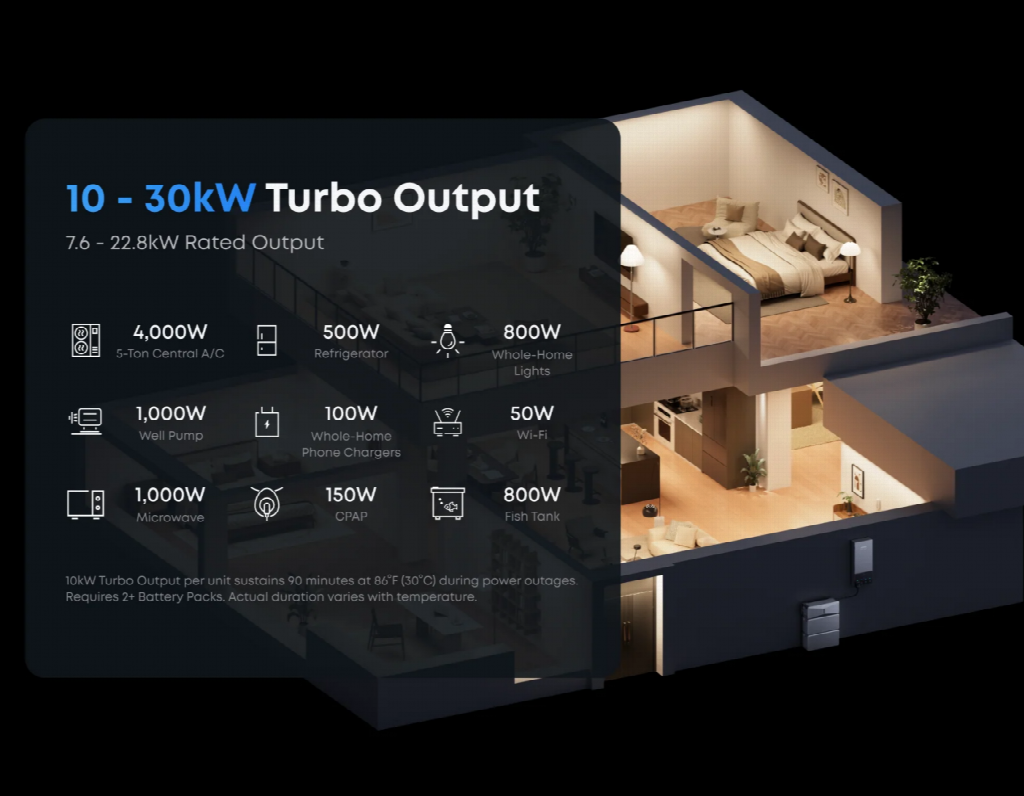
A conventional UPS is often designed to bridge short interruptions or provide enough time for an orderly shutdown. Households that need longer backup periods for multiple circuits may benefit from evaluating a larger energy storage system. The Anker SOLIX E10 Whole-Home Backup is one example of a different approach. Its E10 power module and two B6000 batteries provide a combined nominal battery capacity of 12.288 kWh. The power module supports up to 7.68 kW of continuous output with batteries, while the Power Dock provides an automatic switchover time of 20 milliseconds or less. The B6000 batteries use lithium iron phosphate chemistry and carry UL 9540 and UL 9540A certifications. This type of system serves a broader backup role than a typical desktop UPS, so selection should reflect the circuits and equipment you intend to power.
Conclusion
Replace a UPS battery when its tested runtime falls below your needs, its self-tests repeatedly fail or its manufacturer identifies it for replacement. Battery age provides a useful planning benchmark, but performance checks offer a clearer picture of current condition. Match replacement batteries to the system’s specifications, document the results and test the new installation. If your backup needs have grown beyond short interruptions, review whether a larger battery system is more appropriate for the required runtime and electrical load.
Author

khizarnisar367@gmail.com
Related Posts
HVAC Repair: A Complete Guide to Maintaining Efficient Heating and Cooling Systems
- 0
- 3,085 words
A comfortable indoor environment depends heavily on a properly functioning heating, ventilation, and air conditioning system. Whether it is maintaining cool temperatures...
Read out all
Fence Installation: Improving Property Security, Privacy, and Outdoor Appeal
- 0
- 3,492 words
A well-designed fence is an important addition to any residential or commercial property because it provides security, privacy, and a clearly defined...
Read out all
Everything You Need to Know About Ground Preparation, Soil Management, and Construction Projects
- 0
- 2,592 words
Preparing land for construction requires careful planning, specialized equipment, and a clear understanding of soil conditions. Whether a property owner is planning...
Read out all
Building Stronger Emergency Communication Infrastructure Through Smart Wireless Network Planning
- 0
- 2,615 words
Introduction Reliable communication infrastructure is an essential part of modern building safety, emergency preparedness, and effective incident management. Hospitals, educational institutions, commercial...
Read out all
Sewer Camera Inspection: A Complete Guide to Detecting and Preventing Drainage Problems
- 0
- 2,643 words
Introduction to Sewer System Maintenance Maintaining a properly functioning sewer system is essential for keeping residential and commercial properties clean, safe, and...
Read out all
Smart Strategies for Managing Electrical Demands and Improving Property Safety
- 0
- 2,545 words
Introduction Electricity plays an essential role in modern homes and commercial properties, powering everything from lighting and kitchen appliances to heating systems,...
Read out all