
- 0
- 1,042 word
Creating a functional and organized entertainment space in a modern home means hiding messy wires, picking smart storage, and giving every item a clear spot. You can transform any living room into a relaxing zone by balancing sleek media furniture with hidden compartments for remotes and gaming gear. Start small by decluttering your screen area today to enjoy a stress-free movie night.
Let us walk through how you can build a clean, cozy setup that works for your whole family.
How Do You Plan the Layout of Your Entertainment Space?
To plan your entertainment layout, place your main screen at eye level away from bright window glare, then arrange seating for clear views and easy walking paths. Measure your wall and gear first so your furniture fits the room without crowding your living area.
Good planning stops headaches before you buy a single item. Think of your room layout like setting up a campfire. Everyone needs a good seat, nobody wants smoke in their eyes, and people need room to walk around safely.
Start with your screen placement. Put your television on a wall that does not face a direct, sunny window. Sunlight bouncing off glass ruins a good show fast. Next, sit on your couch and look straight ahead. The center of your screen should sit right at your eye level. If you have to tilt your neck up, your shoulders will ache later.
What Is the Best Furniture for Hiding Media Clutter?
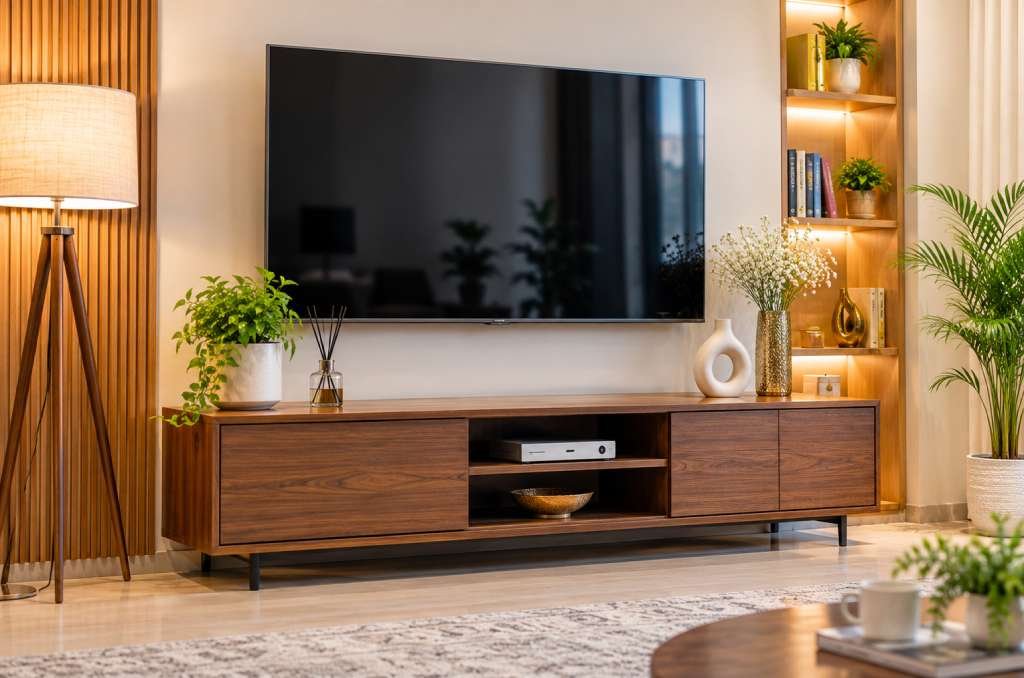
The best furniture for hiding media clutter combines closed cabinets for messy items with open shelves for devices that need airflow or remote signals. Look for media consoles with built-in wire holes in the back and soft-close doors to keep everything neat and quiet.
Picking the right base for your screen changes everything. Open tables look airy, but they show every single cord and dusty box. Closed cabinets hide the mess, which makes a small room feel much bigger right away.
When you shop for a new stand, think about both style and your wallet. For example, if you are comparing TV cabinet price in Bangladesh or browsing local furniture shops anywhere else, focus on sturdy wood and smart storage compartments rather than fancy looks alone. A great stand pays for itself by keeping your expensive gear safe from dust and bumps.
Look for these helpful features when picking your media unit:
- Back cutouts: Pre-drilled holes let cords slip behind the furniture out of sight.
- Adjustable shelves: Moving shelves up or down lets you easily fit tall speakers or game systems.
- Deep drawers: Slide-out bins are great for hiding board games, extra blankets, and thick manuals.
- Slatted or glass doors: These allow your remote control signal to pass through even when the doors are closed.
How Can You Hide Wires and Organize Small Gadgets?
You can hide wires and organize small gadgets by bundling cords together with Velcro straps, running them through wall raceways, and storing remotes in a dedicated tray. Labeling each plug at both ends also saves hours of guessing when you need to unplug a device.
Wires are the biggest enemy of a clean modern home. Even the prettiest room looks messy when black cables dangle down the wall like vines. Thankfully, taming cords takes less than twenty minutes and costs very little.
Start by unplugging everything and untangling the knot. Group cords that go to the same place. Wrap them together with reusable Velcro ties instead of plastic zip ties, since Velcro is easier to undo later. Stick a small piece of painter’s tape near each plug and write the device name on it. You will thank yourself the next time you move or swap a console.
For wall-mounted screens, buy a simple plastic cord cover. You stick it to the wall, tuck the wires inside, and snap the lid shut. You can even paint the plastic cover to match your wall color so it vanishes completely.
Keep small daily items in one easy spot. Put a small wooden bowl or decorative box on your coffee table. Make a house rule that all remotes, headphones, and game controllers go back into that box when the TV turns off.
Open Shelving vs. Closed Cabinets: Which Should You Choose?
Choosing between open and closed storage depends on how much gear you own and how tidy you like to be. Here is a quick look at how both options compare in a busy home.
| Feature | Open Media Shelves | Closed Media Cabinets |
| Visual Clutter | Shows cords, boxes, and dust easily | Hides messy cables and extra gear |
| Airflow & Cooling | Great airflow for hot gaming consoles | Needs back vents so devices stay cool |
| Remote Signals | Works instantly from any angle | Needs glass or slatted doors for signals |
| Child & Pet Safety | Little hands and paws can reach buttons | Keeps expensive electronics locked away |
| Cleaning Effort | Requires weekly dusting around wires | Quick wipe on the outside doors only |
Simple Steps to Organize Your Space Today
You do not need a whole weekend to fix your living room. Try these fast wins right now to see an instant difference:
- Throw away broken cords: Grab a trash bag and toss old chargers or wires that no longer fit anything you own.
- Create a charging station: Place one power strip inside a cabinet drawer so phones and controllers charge out of sight.
- Use vertical wall space: Hang floating shelves above or beside your screen for books, small plants, and framed photos.
- Set up a basket for blankets: Keep a woven basket next to the couch so cozy throws do not pile up on the cushions.
- Switch to streaming sticks: Replace bulky cable boxes with tiny streaming devices that plug right into the back of your screen.
Bring Calm Back to Your Living Room
A clean entertainment space does more than just make your house look nice for guests.
It removes daily visual noise so you can truly relax with the people you love. You deserve a home where movie night starts with pressing play, not hunting for a missing remote under the sofa cushions.
Pick just one small corner of your media setup to tackle today. Gather those loose cables, clear off the top of your stand, and enjoy how peaceful your room feels tonight. What is the very first clutter spot you plan to clear out in your living room?
Author

khizarnisar367@gmail.com
Related Posts
Best IPTV UK 2027: Top 2 British IPTV Services for Live Sports, Movies & TV Series
- 0
- 949 words
Looking for the best IPTV in the UK in 2027? Whether you enjoy live football on a Saturday afternoon or prefer settling...
Read out all