
- 0
- 901 words
AI glasses can help blind and visually impaired people access visual information through object recognition, text reading, voice assistance, and navigation support. Choosing the right device requires more than checking its AI capabilities. Buyers should consider how accurately it describes surroundings, how easily users interact with its features, and whether it supports everyday accessibility needs. Comfort, battery life, smartphone compatibility, and privacy controls also influence long-term usability. Understanding these factors makes it easier to select practical assistive technology.
Essential Features to Look for in AI Glasses for Blind Users
Object Recognition and Real-Time Scene Description
Object recognition helps users identify household items, furniture, doors, and other elements in their surroundings. More advanced systems provide scene descriptions that explain where objects appear and how they relate to one another. When comparing AI glasses for blind users, prioritize accurate recognition, useful contextual descriptions, and responsive AI processing. These capabilities can improve environmental awareness in unfamiliar places. Buyers should also check whether the glasses support spoken descriptions rather than relying exclusively on visual displays.
Text Reading, OCR, and Voice Assistance
Optical character recognition (OCR) allows AI glasses to capture printed words and convert them into spoken information. This feature can help users read menus, signs, product labels, documents, and packaging. Voice assistance adds another layer of accessibility by allowing users to request information through spoken commands. Look for reliable speech recognition, clear audio output, and the ability to ask follow-up questions. These functions make everyday reading and information retrieval more convenient without requiring constant assistance.
Navigation Support and Environmental Awareness
Navigation features can provide spoken directions, identify nearby landmarks, and offer information about routes and public transport. Environmental awareness tools may also describe entrances, pathways, and surrounding objects. Buyers should check whether navigation information comes with accessible audio guidance, since visual directions alone may not meet the needs of blind users. Reliable location information, clear instructions, and compatibility with accessible navigation applications are particularly important when choosing glasses for outdoor activities and unfamiliar environments.
How to Choose AI Glasses Based on Daily Accessibility Needs
Features for Reading, Shopping, and Household Tasks
Consider the activities that require the most visual assistance in everyday life. For reading, prioritize OCR and text-to-speech functions. For shopping, look for product recognition and the ability to read packaging information. At home, object identification and voice-based assistance can help users locate belongings and manage routine tasks. The most useful device should provide practical support across several daily situations rather than offering impressive AI features that have limited real-world value.
Capabilities for Walking, Commuting, and Outdoor Activities
For outdoor use, prioritize navigation assistance, landmark recognition, and timely environmental descriptions. Spoken directions can help users understand routes and locate transit stops, while camera-based recognition may provide additional context about nearby surroundings. Check how the glasses communicate information without distracting users from their mobility techniques. AI guidance should complement, not replace, a white cane, guide dog, or established orientation and mobility practices. Safe navigation requires dependable information and continued awareness of potential hazards.
Compatibility with Smartphones and Assistive Applications
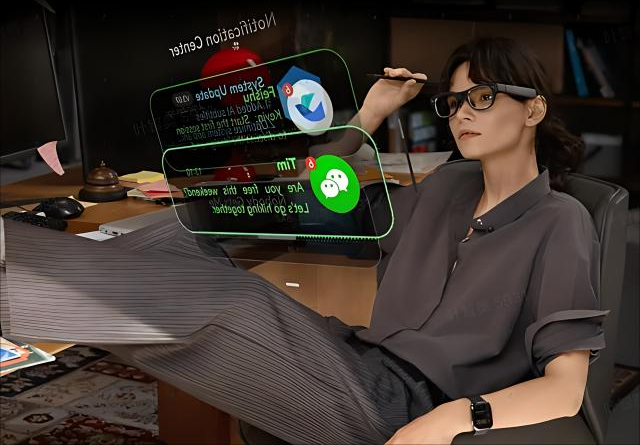
Smartphone compatibility determines how easily AI glasses fit into an existing accessibility setup. Check support for the phone's operating system, Bluetooth connectivity, companion applications, and commonly used assistive tools. RayNeo X3 Pro AI+AR Glasses feature a built-in Android virtual environment that supports everyday apps such as TikTok, Instagram, and WhatsApp through the AR display. The device also includes dedicated tools for navigation, music playback, camera functions, and teleprompting. Buyers should verify which functions offer accessible audio interaction before purchasing.
Comfort, Performance, and Practical Buying Considerations
Frame Weight, Fit, and All-Day Wearing Comfort
Comfort directly affects how often users will wear their AI glasses. Look for a lightweight frame, balanced weight distribution, adjustable nose pads, and secure temple arms. The glasses should remain stable during normal movement without creating excessive pressure around the ears or nose. If possible, test the fit before purchasing. A comfortable design makes it easier to use accessibility features throughout daily routines without frequent adjustments or unnecessary physical discomfort.
Battery Life, Connectivity, and Response Speed
Battery capacity, actual operating time, and charging requirements all influence daily usability. The RayNeo X3 Pro AI+AR Glasses feature a 245mAh battery to support their everyday functions, including navigation and access to built-in apps. Buyers should also consider how frequently they use camera recognition, voice assistance, and other AI features when evaluating battery needs. Stable connectivity and responsive AI processing are equally important, as delayed feedback can interrupt everyday tasks and information access.
Durability, Privacy Controls, and Ease of Operation
AI glasses use cameras and microphones to process information about their surroundings, making privacy controls essential. Check whether the device provides clear recording indicators, permission settings, and options for managing stored information. Durability also matters, particularly for users who wear their glasses regularly or carry them during outdoor activities. Simple voice commands, accessible controls, and straightforward setup can reduce the learning curve and make the device easier to operate independently.
Conclusion
Choosing AI glasses for blind users requires careful attention to accessibility, comfort, and practical performance. Object recognition, OCR, voice assistance, and navigation support should match the user's everyday needs. Buyers should also evaluate smartphone compatibility, battery capacity, privacy controls, and ease of operation. Most importantly, AI glasses should complement established mobility tools rather than replace them. A suitable device can improve access to information, simplify routine activities, and support greater independence in daily life.
Author

khizarnisar367@gmail.com
Related Posts
AR Glasses Review: Comfort, Clarity, and Daily Use
- 0
- 927 words
AR glasses combine wearable design with digital displays, allowing users to access virtual screens, entertainment, and useful information without carrying a traditional...
Read out all
How Do Wrist Controls Make Flying Cameras Easier?
- 0
- 987 words
Wrist controls make flying cameras easier by turning drone operation into a faster, more intuitive experience. Instead of juggling a bulky controller...
Read out all
Antigravity A1 vs DJI Mini 4 Pro: Reframe or Film?
- 0
- 1,036 word
Antigravity A1 and DJI Mini 4 Pro solve aerial video in two very different ways. The key choice is not simply image...
Read out all
Link Building Reseller Strategies for Growing Your Client Base
- 0
- 717 words
Your agency’s client base can grow faster than its internal capacity to deliver specialized SEO work. Link building presents a particular challenge,...
Read out all
A proxy glossary for marketing teams starting their first data project
- 0
- 799 words
You’re probably in a kickoff call where someone says the team needs “rotating residential proxies with city targeting” for a pricing study,...
Read out all
How to Reclaim Gigabytes of Storage Space with Advanced SystemCare Deep Clean
- 0
- 840 words
If you repeatedly find yourself without enough space to install important updates or new applications, you may need to clear out space...
Read out all