
- 0
- 771 words
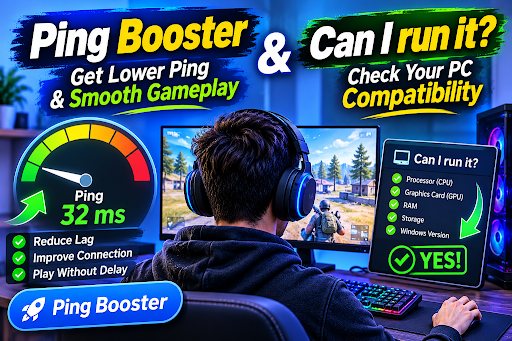
Online gaming has become more popular than ever, but a smooth gaming experience depends on more than just having a powerful computer. Network performance, system specifications, and available hardware resources can all affect gameplay. Players often experience high ping, lag, slow responses, or unexpected performance issues. Fortunately, understanding tools such as a Ping Booster and checking Can I run it requirements can help gamers make better decisions before starting their favorite games.
What Is a Ping Booster?
A Ping Booster is a tool designed to help improve network performance during online gaming. Ping measures the time it takes for data to travel from your device to a game server and back. It is usually measured in milliseconds (ms).
A lower ping generally means faster communication between your computer and the game server. On the other hand, high ping can cause delayed movements, interrupted actions, and frustrating gameplay.
A Ping Booster may help optimize network connections by managing connection routes or reducing unnecessary network activity. However, its effectiveness depends on your internet provider, server location, network conditions, and the particular game you are playing.
Why Does High Ping Affect Gaming?
High ping can make even the most enjoyable multiplayer game difficult to play. Imagine moving your character or shooting at an opponent, but the action appears on the screen several moments later. This delay can affect your performance, especially in competitive games.
Some common reasons for high ping include:
- Weak or unstable internet connections.
- Connecting to distant game servers.
- Background applications using internet bandwidth.
- Network congestion during busy hours.
- Poor Wi-Fi signal strength.
- Problems with your internet service provider.
Identifying the actual cause of lag is important before choosing a solution. A Ping Booster may help in certain situations, but it cannot fix every internet-related problem.
How a Ping Booster Can Help
Using a suitable Ping Booster may help gamers achieve a more consistent connection. Some optimization tools offer features that prioritize gaming traffic, manage background network activity, or select more efficient connection routes.
These features can be useful when several applications are competing for available bandwidth.
For better results, gamers should also consider connecting their computers through an Ethernet cable, closing unnecessary downloads, and selecting a game server closer to their geographical location.
Combining these practices with a suitable network optimization tool may create a more stable gaming environment.
Can I Run It? Check Your PC Before Installing a Game
Before downloading a new game, many players ask an important question: Can I run it on my computer?
Not every PC has the hardware required to run modern games. Some titles demand powerful graphics cards, faster processors, and additional RAM. Installing a game without checking its requirements can lead to poor performance or compatibility problems.
A system compatibility checker can help users compare their computer’s specifications with a game’s minimum and recommended requirements.
Important specifications to check include:
- Processor (CPU): Determines how efficiently your computer handles game calculations.
- Graphics Card (GPU): Controls visual rendering, textures, and graphical effects.
- RAM: Provides memory for running games and other applications.
- Storage: Determines whether your computer has enough available space.
- Operating System: Ensures that your PC supports the game’s software requirements.
Checking these specifications before downloading a game can save time and prevent unnecessary installation problems.
Minimum vs. Recommended System Requirements
Game developers usually provide two types of system requirements.
Minimum requirements describe the basic hardware needed to launch and play a game. However, meeting these specifications does not always guarantee smooth performance.
Recommended requirements indicate the hardware needed for a better gaming experience, often with improved graphics and more stable frame rates.
If your computer only meets the minimum requirements, you may need to lower graphics settings, reduce resolution, or disable demanding visual effects.
Combine Network and PC Optimization
A good gaming experience requires both a stable internet connection and capable hardware. A Ping Booster focuses on network-related performance, while checking whether your PC can run a game helps identify potential hardware limitations.
These are two different aspects of gaming optimization, but both are important.
Keep your graphics drivers updated, remove unnecessary background applications, maintain sufficient storage space, and monitor your internet connection regularly. These simple steps can help your computer perform more efficiently.
Final Thoughts
Gaming performance depends on several factors, including internet stability, hardware compatibility, and system configuration. A Ping Booster may help improve connection consistency in suitable situations, while checking Can I run it requirements helps determine whether your computer can handle a particular game.
By understanding both network performance and hardware limitations, gamers can avoid common problems, make smarter upgrade decisions, and enjoy a smoother gaming experience.
Author

Skybloominc@gmail.com
Related Posts

Free Online Games for Large Groups of 6 to 12 Players
- 0
- 1,444 word
Finding an enjoyable activity for six to twelve friends can be challenging. Some people prefer fast competition, while others enjoy puzzles, teamwork,...
Read out all
Understanding Dota 2 Inventory, Skin Trading, and Digital Goods in Online Gaming
- 0
- 1,258 word
Online gaming has grown into a global entertainment industry where players enjoy competitive matches, social interaction, and personalized gaming experiences. Beyond gameplay,...
Read out all
Why Online Gaming Platforms Are Changing the Way Players Manage Virtual Goods
- 0
- 1,307 word
The online gaming industry has changed dramatically as games have become more interactive, connected, and customizable. Players no longer focus exclusively on...
Read out all
Using Your TV as a PC Display: A Practical HDMI Setup Guide
- 0
- 1,476 word
There are plenty of reasons to connect a computer to a television. Maybe you want a larger screen for a presentation, need...
Read out all
Hypackle: Exploring the Meaning, Uses, and Growing Curiosity Around the Term
- 0
- 1,289 word
Introduction to Hypackle What exactly is hypackle? If you have recently encountered this unusual word online, you may have wondered whether it...
Read out all