
- 0
- 709 words
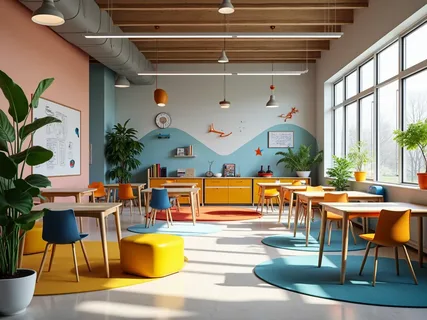
Schools face varied learning needs when students respond differently to visual, practical, collaborative, or independent instruction. Portable classrooms provide additional teaching space, and they allow schools to create layouts suited to different learning activities. Custom portable classrooms also give schools flexibility when specialized learning areas require specific features. Here are a few ways to design portable classrooms for diverse learning styles:
Design Flexible Learning Areas
Start with the activities that will take place in the classroom, rather than choosing furniture first. Individual workstations give students defined areas for reading assignments or computer-based activities. Open arrangements in portable classrooms create room for group projects, discussions, demonstrations, and teacher-led instruction.
Flexible furniture positioning also lets teachers change the room between lessons without redesigning the entire space. A classroom used for lectures in one period might support collaborative workstations later in the day. Standard office multipack configurations, including 2-, 4-, 6-, 8-, and 10-packs, offer different ways to organize learning environments. Room proportions matter when several activities share one space. Leave practical circulation paths between desks, tables, storage areas, and teaching stations; this helps prevent movement from interfering with instruction. Breakout areas can provide smaller spaces for focused discussions or targeted support without requiring a separate building.
Create Specialized Spaces
Varied subjects often require different physical environments, so a single classroom layout may not suit every program. Custom modular spaces allow schools to designate rooms for hands-on science activities, creative projects, or specialized student support. The room should reflect the equipment and teaching methods associated with its intended use. Some specialized configurations that address different learning activities while giving each space a defined purpose include:
- STEM labs: Include work areas suited to experiments and demonstrations.
- Art studios: Provide open surfaces for projects and dedicated material storage.
- Libraries: Combine shelving, reading areas, study tables, and technology stations.
- Special education rooms: Support individualized instruction and specialized equipment.
Multipurpose designs also give schools room to repurpose a classroom as programs change. A specialized room built with adaptable infrastructure offers broader use than a space designed around a single activity. The flexibility in design allows for easy movement and rearrangement of furniture, so the unit can be used long-term.
Support Accessible Learning
Accessible design affects how students enter, move through, and use the classroom. Ramps and accessible entry approaches support wheelchair users, and wider doorways and clear circulation paths allow easier movement inside. Interior layouts also need appropriate turning space, particularly where furniture, doorways, or restroom facilities are included. Accessibility works well when incorporated during the floor-plan stage rather than added later. Portable classrooms can include accessible restrooms and ramps with proper slope and handrails. These features support participation across different physical abilities, while keeping the classroom practical for daily instruction.
Customize Interior Elements
Interior details influence how efficiently students and teachers use the available space. Portable classroom suppliers can configure the interior layout and various features to create a productive learning environment. Some features include:
- Custom cabinetry: Add storage where teachers can reach materials without blocking student pathways.
- Whiteboards: Position writing surfaces where students have clear sightlines during instruction.
- Projector placement: Plan screens and equipment around seating, lighting, and viewing angles.
- Elevated ceilings: Create additional vertical space to prevent a cramped space.
- Custom entryways and windows: Match access, daylight, ventilation, and campus design requirements.
Integrate Learning Technology
Technology can fit into the original classroom plan; the orientation of smart boards and interactive displays should account for the board size, viewing angle, and teacher access. Digital learning materials are also more effective when students have reliable access to power and a network. Wired and wireless connections allow access to assignments, online presentations, and connected classroom equipment. Video conferencing also enables teachers to broadcast instruction from afar or bring outside participants into the classroom. Planning these systems helps the classroom accommodate evolving technology needs without disrupting instruction.
Design Portable Classrooms
A flexible classroom design gives schools room to respond when teaching programs or student requirements change. Start by identifying the activities, technology, accessibility features, and specialized equipment each space will support. Match those requirements with a floor plan and interior features, so the room serves its intended purpose. Explore custom portable classrooms to discuss your educational requirements and develop a layout suited to your students and programs.
Author

fraz.ashraf@gmail.com
Related Posts

10 Things to Know Before Buying an Honor Phone in Bangladesh
- 0
- 1,027 word
Before spending money on an Honor phone in Bangladesh, it helps to understand a few things about the brand itself, not just...
Read out all
Key Considerations When Securing Large Commercial and Industrial Properties
- 0
- 717 words
Protecting a small shopfront and protecting a sprawling industrial site are not the same task, and treating them as if they were...
Read out all
Before You Replace Your HVAC in the Pacific Northwest: A Practical Home Check That Prevents Regret
- 0
- 1,306 word
Replacing a heating and cooling system in the Pacific Northwest is not always a simple equipment swap. Wet winters, occasional freezing mornings,...
Read out all
Pinpointing Gutter Downspout Clogs Before a Storm: A Homeowner’s Diagnostic Guide.
- 0
- 1,200 word
Most gutter problems do not start in the trough. They begin where water must squeeze through the smallest openings, especially the drop...
Read out all
Choosing the Right Replacement Roof for Pacific Northwest Weather
- 0
- 1,114 word
Rain, wind, tree debris, and long stretches of damp weather define the Pacific Northwest. When a roof nears the end of its...
Read out all
A Practical Checklist for Building a Layered Commercial Security Plan
- 0
- 1,073 word
Key Takeaways A comprehensive commercial security plan utilizes multiple measures to protect people, property, and daily operations, rather than relying on a...
Read out all